

Sermon Recorder for Windows
 Look and Listen Multimedia has partnered with Behest Software to make available the Behest Sermon Recorder for Windows that allows you to record sermons straight to MP3 using any Windows based computer.
Features
|
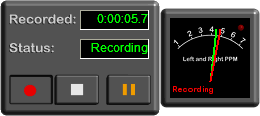 (Recording controls visible)  (Recording controls hidden) |
 60-day full featured trial version including dual file output (Windows 11, 10, 8.1, 8 and 7 32-bit and 64-bit, Windows Vista, Windows XP) |
 £30.00 ($43.00 USD, $56.00 CAD, $64.00 AUD, €39.00 EUR) |
More about the Sermon Recorder for Windows
Why would I want to record to a computer rather than to tape or straight to CD?
If you record to tape or CD and want to get your sermons online, you have to read them into a computer somehow, so why not record them onto your computer in the first place?
If you want to make copies of tapes or CDs then you need copier equipment - recording to a PC means you can easily burn CDs and put the sermon straight onto people's MP3 players or memory sticks.
Recording straight to a computer means that you are not restricted to the amount of material you can record in one go and so don't get the same breaks that happen when you have to change disk or tape.
Recording to PC means you don't have to keep buying CDs or tapes just to record onto, and you don't have to worry about whether the CD recorder will reject the CD and cause you to lose the recording altogether - something that does sometimes happen!
Recording to MP3 on a computer rather than directly to CD or to tape leaves you free to easily...
- Master audio CDs using Windows Media Player or other CD writing software
- Copy the sermon onto MP3 players and iPods
- Easily make the sermon available online
- Edit the sermon recording using audio editing software, if necessary. This allows you (depending on your editing software) to remove unwanted material, reduce noise and add any effects you require.
The Sermon Recorder is easy to use and won't clutter your computer desktop
Controlling the recorder is as easy as pressing a record button to begin recording and a stop button to finish recording, with a pause function also available when required.
When recording is finished the user is asked to enter the sermon title, series
and the speaker's name and these are saved into the MP3 files so media players
can display them.
The Sermon Recorder then automatically saves the files which means they have a
standard filename format and are saved to the same folder each time. The
folder and filename format are easily configurable.
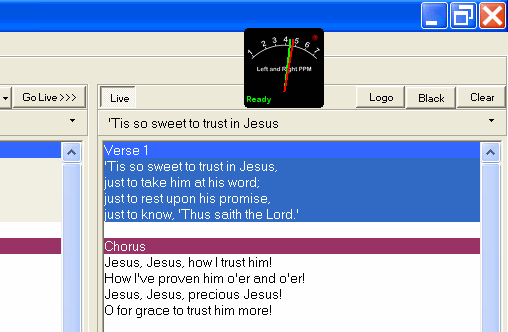
The recorder is very compact in terms of space used on your desktop. The image to the side shows the program window sitting over the top of a projection software window - as you can see it doesn't get in the way at all, just sitting there above the other application windows.
It is also very light on your computer's resources, your PC will hardly know it's running the program so it can happily get on with running projection software or whatever else you use the computer for - even when you're recording two files at once!
More than just a Sermon Recorder
Because it is essentially just an audio recorder, you can also use the Sermon Recorder in your office to record teaching material, something I have done for our own church's small group teaching series. In fact, it can be used to record any form of audio that you can get into your computer - sermons, teaching, dictation, music, singing, etc.
System Requirements
The Sermon Recorder has the following system requirements...- Any version of Windows from 11 back to XP either 32-bit or 64-bit
- Windows Media Player 10 or later which provides an encoder to generate MP3 output.
If you're not sure if your system meets these requirements, just download the program and give it a try!
Legal Note: Unlike some other MP3 recording software, the Behest Sermon Recorder does not illegally include unlicensed MP3 encoding software, which is why it requires Windows Media Player 10 or later to be installed.